Install LingoHey
LingoHey is a Chrome extension: once installed, select any word on an English page to look it up. Use either option below — both install the same extension.
Option 1: Chrome Web Store
One click to install, updates automatically. Requires access to the Chrome Web Store.
Add to Chrome — it’s freeOption 2: Offline package
Use this when the Chrome Web Store won’t open. It is the same extension as the store version — same sign-in, vocabulary and settings — but it doesn’t update itself.
Download the offline packageVersion 0.9.1 · 2.5 MB · released October 31, 2026
SHA-256: 09723e70d9c31ce3136e037b700dd430a595616cc53a90722390bafa422e4344
Installing the offline package
- Download and unzip the package to get a
LingoHey-0.9.1folder. Keep it somewhere permanent (such as Documents) — moving or deleting it removes the extension. - Type
chrome://extensionsin Chrome’s address bar and press Enter to open the Extensions page. - Turn on “Developer mode” in the top right.

- Click “Load unpacked” in the top left and select the folder from step 1 (the folder itself, not a file inside it).

- When LingoHey shows up in the list, you’re done. Click the puzzle icon in the toolbar to pin LingoHey.
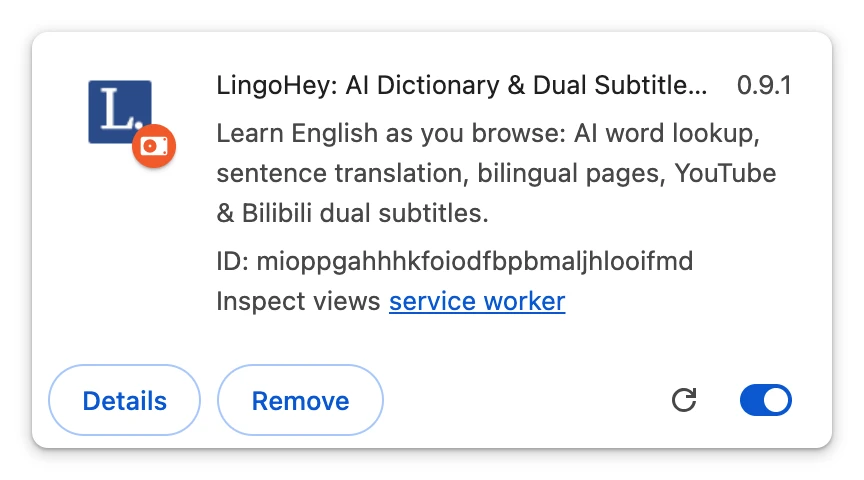
Screenshots are from Chrome in English; other versions may look slightly different.
FAQ
Chrome warns about extensions in Developer mode. What should I do?
Some Chrome versions remind you about extensions that weren’t installed from the store. It is a generic reminder for every offline-installed extension: dismiss it and don’t disable LingoHey. Keep Developer mode on — turning it off disables offline-installed extensions.
How do I update the offline version?
The offline version doesn’t update itself. When a new version is out, download the new package here, unzip it, replace all files in your existing folder, then click the reload button on the LingoHey card at chrome://extensions. Your sign-in and settings stay. If you can reach the store, switch to the store version to get automatic updates.
See what’s newDoes it work in Edge, Brave and other browsers?
Most Chromium-based browsers work. In Edge, open edge://extensions, turn on Developer mode and load the unzipped folder; other browsers have the same two options on their extensions page. We mainly test in Chrome — tell us if something doesn’t work. Firefox and Safari aren’t supported.
Is it the same as the store version? Does my data sync?
Yes. The offline package is the exact version submitted to the Chrome Web Store, with the same extension ID: sign in to the same LingoHey account and your vocabulary, lookup history, AI usage and plan are all there. You can’t install both at once — remove the store version at chrome://extensions before installing the offline one (and vice versa).
Is the package safe?
It is downloaded from this website and matches the version submitted for Chrome Web Store review, plus one line that pins the extension ID. You can check the file against the SHA-256 above.
Can I download LingoHey from other websites?
Please install only from this website or the official store (Chrome Web Store). Some third-party extension download sites repost the LingoHey package without the line that pins the extension ID, so it gets a different ID: you can’t sign in, your vocabulary won’t sync, and there is no way to verify the files weren’t modified.